flexo printing troubleshooting
This wiki guide covers systematic troubleshooting steps for frequent flexo printing machine faults, abnormal ink transfer errors, registration failures and running breakdowns, providing targeted operational solutions and daily maintenance tips to reduce production downtime and improve printing yield.
Flexo printing troubleshooting refers to the standardized detection, cause analysis and problem-solving process for mechanical faults, printing quality anomalies and system mismatches during full-process flexographic printing production. Modern high-speed flexo presses involve servo transmission systems, ink circulation units, drying modules and tension control systems, so minor parameter deviations or component wear will trigger continuous printing failures. Systematic troubleshooting helps operators locate root causes rapidly instead of blind parameter adjustment, cutting material waste and machine stop time effectively.
Flexo printing failures can be divided into three core categories according to fault sources: mechanical system faults, ink and metering system faults, and substrate matching faults. Mechanical faults mainly include tension fluctuation, color registration deviation and cylinder jitter caused by transmission part wear. Ink system faults cover unstable ink supply, doctor blade streaks and uneven ink density. Substrate matching faults are related to poor ink adhesion, substrate stretching and surface static problems caused by different base material characteristics.
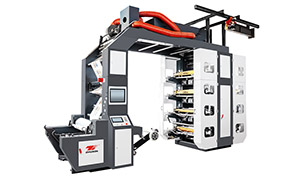
High Speed Flexo Printing Machine - Stack Flexo Flexo Printing Machine
Standard flexo troubleshooting follows a fixed step-by-step workflow suitable for all web-fed flexo equipment. The first step is to observe defective printing samples to judge defect types and distribution rules. The second step is to check real-time machine parameters including running speed, printing pressure, ink viscosity and drying temperature. The third step is to inspect vulnerable wearing parts such as doctor blades, anilox rollers and printing plates. The last step is to adjust parameters or replace accessories for verification and record fault data for later reference.
Rapid troubleshooting of top emergency flexo faults is critical for continuous mass production. For cross-color registration deviation, operators need to calibrate servo synchronization parameters and check web tension balance instead of lowering machine speed blindly. For regular strip streaks on printed surfaces, most problems come from scratched anilox roller cells or uneven doctor blade fitting pressure, requiring roller cleaning or blade angle calibration. For sudden ink foaming, workers need to adjust ink circulation speed and add defoamer moderately to avoid pattern missing points.
Preventive maintenance is the core part of advanced flexo troubleshooting systems, which reduces over 70% of sudden printing faults. Daily maintenance includes cleaning residual ink inside anilox roller cells before machine shutdown, checking blade parallelism every shift, and testing substrate corona treatment effect regularly. Weekly maintenance focuses on lubricating transmission gears and calibrating printing cylinder pressure. Complete fault logs and regular staff skill training can further improve overall on-site troubleshooting efficiency for printing workshops.
With the upgrading of intelligent flexo presses, automatic online troubleshooting systems have been widely equipped in modern printing factories. These intelligent systems can monitor real-time machine operating data, predict potential component wear risks in advance, and give automatic parameter correction suggestions. Combining manual experience with intelligent digital troubleshooting can maximize machine operation stability and lower overall production maintenance costs in long-term flexo printing operations.