flexo printing maintenance
This page focuses on flexo printing maintenance, providing detailed information on how to care for your flexo printing equipment, conduct regular checks, and troubleshoot common problems to ensure optimal performance and extend the lifespan of your press.
Regular maintenance is crucial for the smooth operation of a flexo printing press. Proper care can prevent breakdowns, reduce downtime, and improve print quality. The maintenance of a flexo press can be divided into daily, weekly, monthly, and annual tasks, each with its own set of procedures and focus areas.
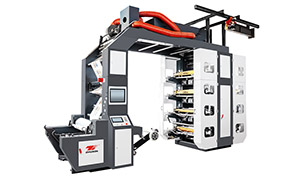
High Speed Flexo Printing Machine - Stack Flexo Flexo Printing Machine
Daily maintenance tasks are essential for keeping the press running smoothly on a day - to - day basis. This includes cleaning the press after each print run to remove ink residues, paper dust, and other debris. Pay special attention to the anilox rollers, plate cylinders, and impression cylinders, as these are key components in the printing process. Use appropriate cleaning solutions and tools to avoid damaging the surfaces. Also, check the ink and solvent levels and top them up as needed to ensure uninterrupted printing. Lubricate the moving parts, such as gears and bearings, according to the manufacturer's recommendations to reduce friction and wear.
Weekly maintenance involves more in - depth checks and adjustments. Inspect the anilox rollers for any signs of wear or damage, such as clogged cells or scratches. Clean the anilox rollers thoroughly using specialized cleaning equipment if necessary. Check the tension of the belts and chains and adjust them if they are loose. Also, examine the electrical connections and wiring for any signs of damage or corrosion and tighten any loose connections. This helps to prevent electrical problems that could cause the press to malfunction.
Monthly maintenance focuses on the overall performance and calibration of the press. Check the registration accuracy of the press by printing a test pattern and making any necessary adjustments to the plate cylinders or other components. Inspect the drying system to ensure that it is working properly and that the temperature and airflow are set correctly. Clean or replace the air filters in the press to maintain good air quality and prevent dust from entering the system. Additionally, check the condition of the doctor blades and replace them if they are worn or damaged.
Annual maintenance is a comprehensive overhaul of the press. This may involve disassembling some of the major components for inspection and cleaning. Check the condition of the gears, bearings, and other mechanical parts and replace any that are worn beyond repair. Inspect the frame of the press for any signs of cracks or deformation and make any necessary repairs. Update the software and firmware of the press if applicable to ensure that it is running the latest version with improved features and bug fixes. By following a regular maintenance schedule and addressing any problems promptly, you can keep your flexo printing press in top condition, reduce the risk of breakdowns, and achieve consistent high - quality prints.