flexo impression setting
This page provides comprehensive information on flexo impression setting, covering the importance of impression setting, how to adjust impression pressure, the role of the impression roller, and tips for optimizing print quality through proper impression setting.
Flexo impression setting is a crucial aspect of the flexo printing process that directly affects print quality. The impression is the contact between the substrate, the printing plate, and the impression roller, and it determines how well the ink is transferred from the plate to the substrate. Proper impression setting is essential for achieving sharp text, vibrant colors, and consistent print quality across the entire print run.
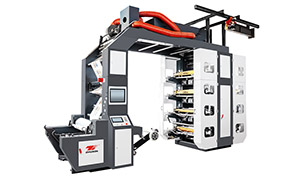
High Speed Flexo Printing Machine - Stack Flexo Flexo Printing Machine
The impression pressure is one of the key factors in flexo impression setting. It refers to the force applied by the impression roller to press the substrate against the printing plate. The right impression pressure is necessary to ensure good ink transfer without causing damage to the substrate or the plate. If the impression pressure is too low, the ink may not be transferred properly, resulting in light or patchy prints. On the other hand, if the impression pressure is too high, it can cause the substrate to deform, the plate to wear out prematurely, or even damage the anilox roller. To adjust the impression pressure, you need to refer to the press's control panel or manual. Most modern flexo presses allow for precise adjustment of the impression pressure, either manually or automatically. Start with a low pressure setting and gradually increase it while printing test patterns until you achieve the desired print quality. Monitor the print closely for any signs of over - or under - impressioning and make further adjustments as needed.
The impression roller also plays a significant role in flexo impression setting. It is the component that applies the pressure to the substrate and helps to ensure even contact between the substrate and the plate. The surface condition of the impression roller is crucial for achieving good print quality. A smooth, clean impression roller surface helps to distribute the pressure evenly and prevent ink smudging or streaking. Regular cleaning and maintenance of the impression roller are essential. Clean the impression roller after each print run to remove ink residues, paper dust, and other debris. Inspect the roller surface for any signs of wear, such as scratches or dents, and replace it if necessary. Some impression rollers are covered with a rubber or silicone sleeve, which can be replaced when worn to restore the roller's performance.
In addition to impression pressure and the impression roller, other factors can also affect flexo impression setting and print quality. The substrate type and thickness play a role in determining the appropriate impression settings. Thicker or stiffer substrates may require higher impression pressure, while thinner or more flexible substrates may need lower pressure to avoid deformation. The ink viscosity and type also influence impression setting. Thicker inks may require more pressure to transfer properly, while thinner inks may be more prone to smudging if the pressure is too high. The plate height and condition can also affect impression. A worn or uneven plate may require adjustments to the impression pressure to achieve consistent print quality. By considering all these factors and making proper adjustments to the impression settings, you can optimize the print quality in flexo printing, ensuring that your prints meet the highest standards of sharpness, color accuracy, and consistency.