flexo doctor blade replacement
This page offers a practical guide on flexo doctor blade replacement, covering how to select the right doctor blade, the step - by - step replacement procedure, and maintenance tips to extend the lifespan of doctor blades.
The doctor blade in a flexo printing press plays a vital role in controlling the amount of ink transferred from the anilox roller to the printing plate. It wipes off excess ink, leaving a precise and uniform layer of ink on the anilox roller cells. Over time, doctor blades can wear out, become damaged, or lose their effectiveness, which can lead to print quality issues such as ink smudging, streaking, or uneven ink coverage. Therefore, regular replacement of doctor blades is essential for maintaining optimal printing performance.
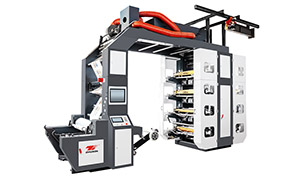
High Speed Flexo Printing Machine - Stack Flexo Flexo Printing Machine
Selecting the right doctor blade is the first step in the replacement process. There are several factors to consider when choosing a doctor blade, including the material, thickness, and edge profile. Common materials for doctor blades include steel, plastic, and composite materials. Steel blades are durable and can withstand high - speed printing, but they may be more prone to scratching the anilox roller if not properly maintained. Plastic blades are softer and less likely to damage the anilox roller, but they may wear out faster. Composite blades combine the advantages of both materials, offering good durability and anilox protection. The thickness of the doctor blade should be chosen based on the printing pressure and the anilox roller specifications. Thicker blades can handle higher pressures but may require more force to wipe the ink effectively. The edge profile of the doctor blade, such as beveled or lamella, also affects its performance in different printing applications.
Once you have selected the right doctor blade, you can proceed with the replacement procedure. First, stop the flexo press and ensure that it is in a safe and stable position. Release the pressure on the doctor blade assembly to relieve the tension on the old blade. Carefully remove the old doctor blade from the holder, taking note of its orientation and position. Clean the doctor blade holder and the surrounding area to remove any ink residues or debris. Install the new doctor blade into the holder, making sure that it is properly aligned and seated. Gradually apply pressure to the doctor blade assembly, starting with a low pressure and gradually increasing it to the recommended level. Check the doctor blade for any signs of leakage or improper contact with the anilox roller and make adjustments if necessary.
To extend the lifespan of doctor blades, regular maintenance is important. Inspect the doctor blades regularly for signs of wear, such as rounded edges, scratches, or cracks. Replace the blades as soon as any signs of wear are detected to prevent print quality issues. Keep the doctor blade holder clean and free of ink buildup, as this can affect the performance of the blade. Adjust the doctor blade pressure according to the printing conditions and the anilox roller specifications. Excessive pressure can cause the blade to wear out faster and may damage the anilox roller, while insufficient pressure can result in poor ink wiping and print quality problems. By following these selection, replacement, and maintenance tips, you can ensure that your flexo doctor blades perform effectively, providing consistent and high - quality prints for your flexo printing projects.