clean flexo anilox
This webpage provides a step - by - step guide on how to clean flexo anilox rollers, covering different cleaning methods, the importance of cleaning, and tips for maintaining anilox rollers in good condition.
Anilox rollers are a critical component in flexo printing, responsible for transferring a precise amount of ink from the ink pan to the printing plate. Over time, anilox rollers can become clogged with dried ink, paper dust, and other contaminants, which can affect ink transfer and print quality. Therefore, regular cleaning of anilox rollers is essential for maintaining optimal printing performance.
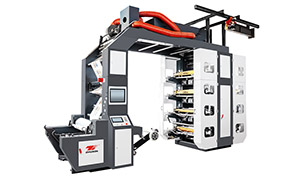
High Speed Flexo Printing Machine - Stack Flexo Flexo Printing Machine
There are several methods for cleaning flexo anilox rollers, each with its own advantages and disadvantages. One common method is manual cleaning using a soft - bristled brush and a cleaning solution. This method is suitable for light - to - moderate cleaning tasks and allows for precise control over the cleaning process. However, it can be time - consuming and may not be effective for removing stubborn ink deposits. To manually clean an anilox roller, first, remove it from the press and place it on a clean, stable surface. Apply the cleaning solution to the roller surface and use the brush to gently scrub the cells in a circular motion. Rinse the roller thoroughly with water and dry it with a clean, lint - free cloth.
Another method is ultrasonic cleaning. Ultrasonic cleaners use high - frequency sound waves to create cavitation bubbles in a cleaning solution. These bubbles implode near the surface of the anilox roller, dislodging dirt and ink particles. Ultrasonic cleaning is highly effective for removing stubborn ink deposits and can clean multiple anilox rollers simultaneously. However, it requires specialized equipment and may be more expensive than manual cleaning. To use an ultrasonic cleaner, fill the tank with an appropriate cleaning solution, place the anilox rollers in the basket, and run the cleaner according to the manufacturer's instructions. After cleaning, rinse the rollers with water and dry them thoroughly.
Laser cleaning is a more advanced method that uses a laser beam to vaporize the ink and contaminants on the anilox roller surface. This method is very precise and can clean even the smallest cells without damaging the roller. Laser cleaning is also fast and efficient, reducing downtime during the cleaning process. However, it requires highly specialized equipment and trained operators, making it less accessible for some printing facilities. Regardless of the cleaning method used, it is important to follow some general tips for maintaining anilox rollers. Store anilox rollers in a clean, dry environment when not in use to prevent dust and moisture from accumulating on the surface. Avoid touching the roller surface with bare hands, as the oils from the skin can transfer to the roller and attract dirt. Regularly inspect the anilox rollers for signs of wear or damage, such as scratches or clogged cells, and replace them if necessary.
In conclusion, cleaning flexo anilox rollers is a crucial part of flexo printing maintenance. By choosing the right cleaning method and following proper maintenance practices, you can ensure that your anilox rollers remain in good condition, providing consistent ink transfer and high - quality prints for your flexo printing projects.