
 HOT LINE: +86-13968935808
We offer flexo printing machines and complete packaging solutions, certified by CE and ISO9001.

STACK FLEXO PRINTING MACHINE
STACK FLEXO PRINTING MACHINE
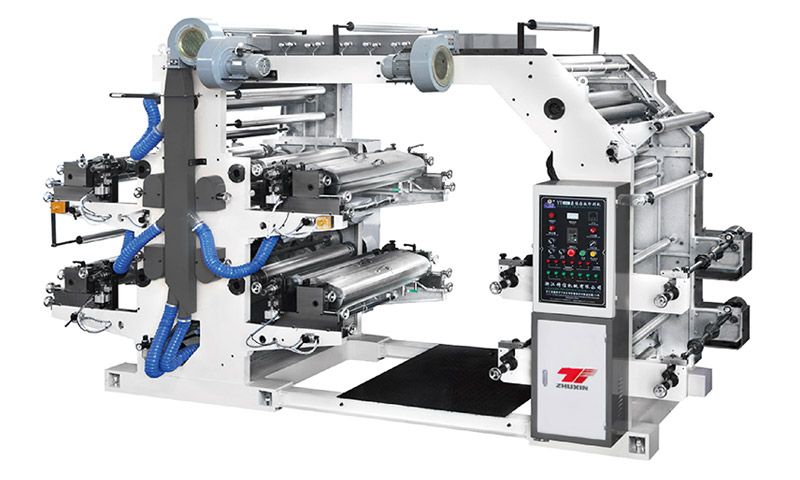
1. Easy to operate, with soft start and accurate color matching.
2. The digital meter counter can preset the printing quantity, automatically stop when the set quantity is reached, and also stop automatically when the material breaks.
3. The anilox roller ensures uniform ink transfer and consistent ink color.
4. Equipped with a reliable drying system that supports high-speed operation and automatically shuts down when the machine stops.
5. Variable frequency speed regulation allows adaptation to different printing speeds.
| Model | YT-4600 | YT-4800 | YT-41000 |
| Maximum Material Width | 600mm | 800mm | 1000mm |
| Maximum Printing Width | 560mm | 760mm | 960mm |
| Range of printing length | 200-1100mm | ||
| Max diameter of web | ф450mm | ||
| Maximum Printing Speed | 5-50m/min | ||
| Dimensions | 4200×1600×2400mm | 4200×1800×2400mm | 4200×2000×2400mm |
| Plate thickness | 2.38mm | ||
Q: How do I prevent ink from drying on the anilox roller during a short pause on my 4 Colors Flexo Printing Machine?
On a 4 Colors Flexo Printing Machine, even a 3‑minute stop can cause solvent or water‑based ink to dry in anilox cells, leading to loss of volume and streaking. Enable the "idle rotation" feature (if available) that slowly turns the anilox roller with the chamber closed. Alternatively, set the press to "circulation mode" – keep the pump running and the roller dipping into the ink. For longer stops, manually wash the anilox with a soft brush and anti‑dry spray. Some operators install a fine mist humidifier near the print station. Never leave the anilox exposed to moving air from dryers – turn off blowers during pauses.
Q: Why does my 4 Colors Flexo Printing Machine leave a ghost image of the first color in the second color‘s solid areas?
Ghosting on a 4 Colors Flexo Printing Machine occurs when the first color ink is not fully dried or fixed before the second color applies, causing ink to transfer back to the second color plate (set‑off). Increase the inter‑color drying – add a hot air knife or UV lamp between stations. Also reduce the first color ink film thickness by using a lower‑volume anilox. Check that the second color impression pressure is not too high; excessive pressure can pick up wet ink. If ghosting appears as a pattern, the plate may be picking up residual ink from idler rollers – clean all guide rollers with solvent.
Q: How do I calibrate the print repeat length on a 4 Colors Flexo Printing Machine for different die‑cutting jobs?
On a 4 Colors Flexo Printing Machine, repeat length is controlled by the gear ratio between the print cylinder and the main drive. For a new job, first measure the exact circumference of the mounted plate cylinder (including tape and plate thickness). Then set the electronic line shaft or mechanical gearbox to match the repeat length required (e.g., 400 mm). Run a test print and measure the distance between four registration marks. Adjust using the "repeat trim" function in 0.1 mm increments. For servo‑driven presses, you can store up to 200 repeat presets. Calibration errors >0.5 mm will cause waste when combined with a rotary die cutter.
Q: Can I use my 4 Colors Flexo Printing Machine to print varnish or primer as one of the colors?
Absolutely. A 4 Colors Flexo Printing Machine can dedicate one deck for primer or varnish instead of a second color. For primer (adhesion promoter), use a smooth anilox (200–300 lpi, 4–6 BCM) to apply a thin, even coat before the main color. For overprint varnish, use a higher line screen (400+ lpi) and low volume (1.5–2.5 BCM) to avoid tackiness. Ensure the varnish is compatible with your ink system – water‑based varnish with water‑based ink, etc. Clean the varnish deck thoroughly after each run because varnish residues harden quickly. This dual‑purpose capability makes your four‑color press more versatile without extra machinery.
Q: What causes banding or "barber pole" streaks across the print on a 4 Colors Flexo Printing Machine?
Banding on a 4 Colors Flexo Printing Machine appears as diagonal or horizontal stripes and usually points to a damaged anilox roller bearing, a bent plate cylinder shaft, or uneven doctor blade pressure. First, run the press with the chamber removed and observe the anilox roller surface – any visible wobble indicates bearing failure. Remove the plate cylinder and roll it on a flat surface; if it wobbles, replace it. Also check that the doctor blade is clamped evenly – tighten from center outward. A simple fix: clean the anilox with a copper brush to remove dried ink that can cause hydraulic pressure variations. Banding ruins customer confidence, so inspect weekly.
05/18
2026
4 Colors Flexo Printing Machine for Short Runs: Strategies to Compete with Digital
Digital printing has eaten away at short run work, but flexo still has advantages in speed and cost per unit once certain thresholds are met. To make a 4 Colors Flexo Printing Machine competitive for short runs (500-2000 meters), converters must adopt specific strategies. First, ...
04/30
2026
Boosting Output from Your 4 Colors Flexo Printing Machine via the Web Tension Stability Keyword
Running a 4 Colors Flexo Printing Machine at its peak speed – often 200 m/min or more – requires more than just fast-drying inks and precise aniloxes. The hidden bottleneck for many converters is web tension stability. This Keyword is the key to minimizing register errors, wrinkl...
04/30
2026
Mastering 4 Colors Flexo Printing Machine with the Dot Gain Control Keyword
The 4 Colors Flexo Printing Machine is a workhorse for high-quality label, carton, and flexible packaging production. Unlike two-color machines, a four-color unit allows full-color process printing (CMYK) in a single pass, drastically reducing lead times. However, achieving consi...
04/30
2026
Maintaining the Drying System on Your 4 Colors Flexo Printing Machine for Optimal Performance
The drying system is vital to a 4 Colors Flexo Printing Machine's productivity. Poor drying leads to smearing, blocking, and reduced line speed. Here's how to keep it in top shape. For hot air dryers, the most common issue is clogged filters. Dust, lint, and ink mist accu...